How OIG Screening works
Overview
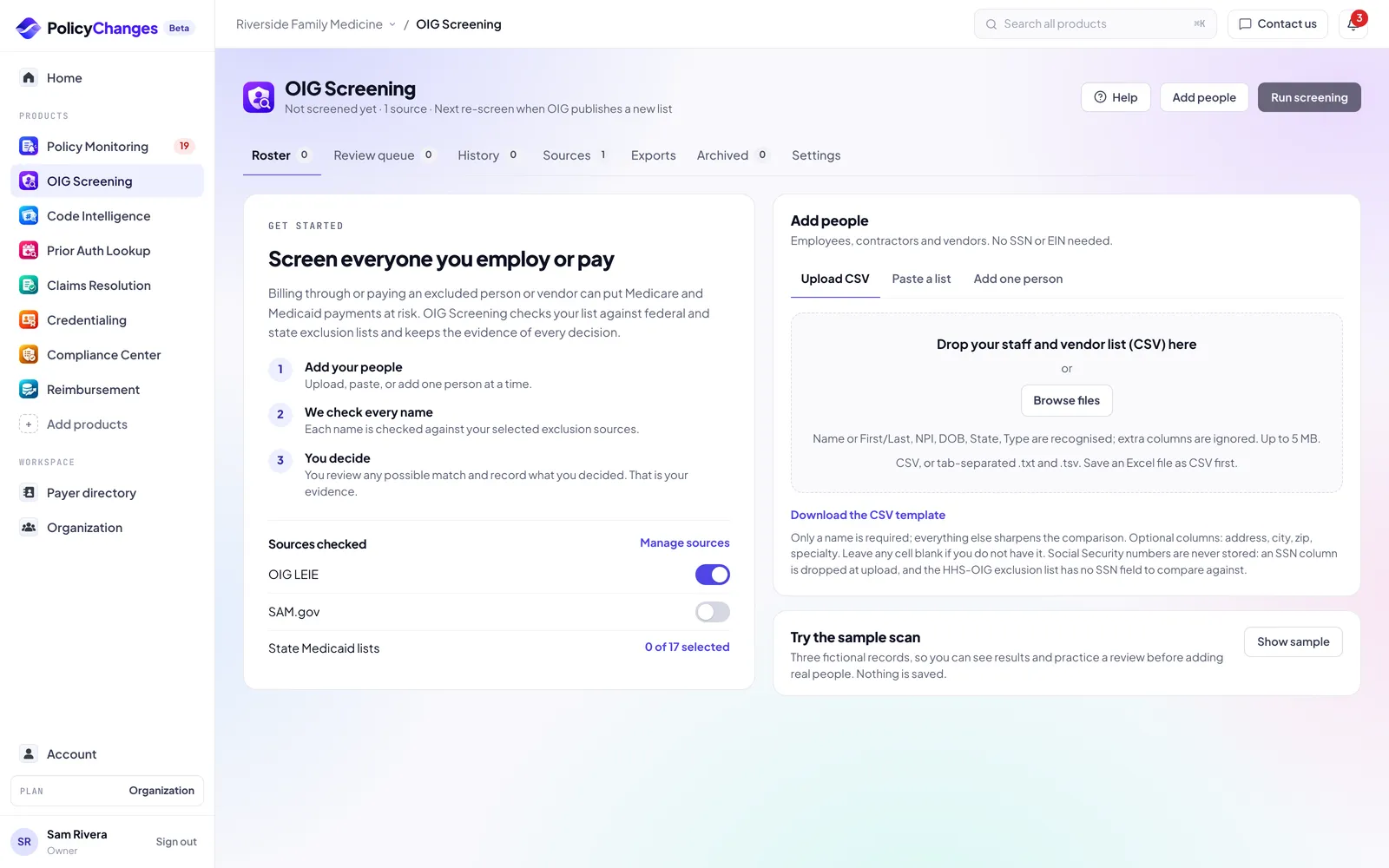
Billing through or paying an excluded person or vendor can put Medicare and Medicaid payments at risk. OIG Screening checks your list against the HHS-OIG exclusion list (LEIE), SAM.gov and the state Medicaid lists you choose.
Possible matches wait in a review queue for a person to decide. Nothing is cleared automatically, and every screening and decision is kept as audit evidence.
The line under the product title tells you when your last completed screening ran, which sources you check and when the next automatic re-screen happens. If the latest screening did not complete, it says so in amber.
Getting started
- Optional: choose See sample results for three fictional records, their results and a practice review. Nothing is saved.
- Click Add people. Upload a CSV, paste a list or add one person at a time.
- Open Sources and pick the federal and state lists to check. OIG LEIE and SAM.gov are on for a new account. Sources show only the lists that are loaded and available. Add every state where you bill Medicaid.
- Click Run screening.
- Open Review queue and record a decision for each possible match.
- In an organization, sign off the screening in Organization, OIG sign-off once the review queue is empty.
Adding people
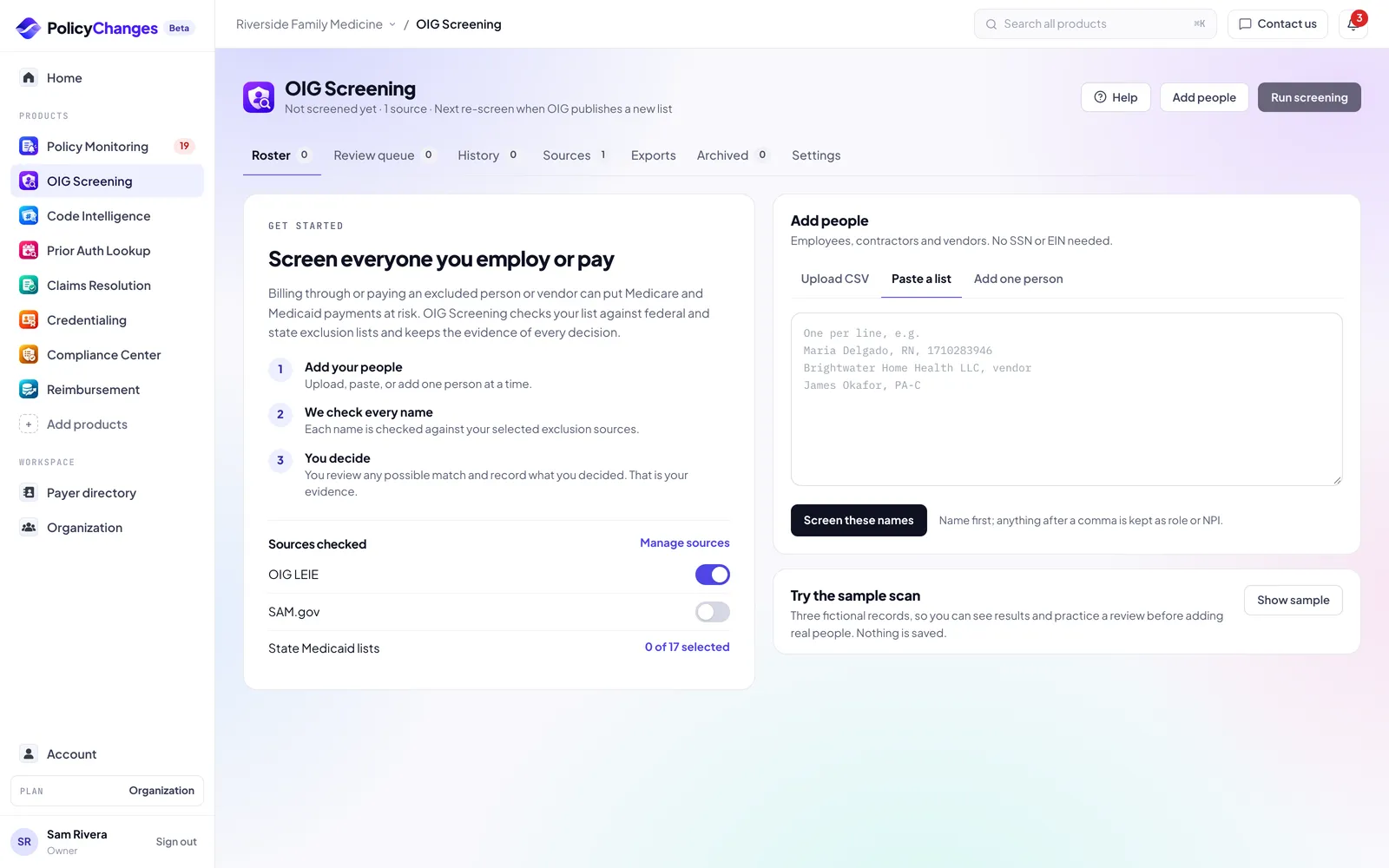
Only a name is required. Date of birth, NPI, state and type (person or business) sharpen the comparison. Social Security numbers and EINs are never needed: an SSN column is dropped at upload, and the OIG list has no SSN field to compare against.
- Upload a CSV
- Drop a CSV, an Excel .xlsx workbook, or a tab separated .txt or .tsv, up to 5 MB. From a workbook only the first sheet is read. Columns named Name or First and Last, NPI, DOB, State, Role and Type are recognized, extra columns are ignored. A CollaborateMD provider export is read as is, and SSN and EIN columns are dropped before anything is saved. An older .xls file has to be saved as .xlsx or CSV first, or start from the CSV template.
- Paste a list
- One person per line, name first. Anything after a comma is kept as role or NPI. Credentials such as MD, PA, MA or RN are never read as a state; write the state name in full, such as Maryland or Massachusetts.
- Add one person
- Full name or business name, role, and optionally NPI, date of birth and state. The role is saved on the record.
- Checks on what you enter
- An NPI must pass the NPI check digit, a date of birth must be a real date in the past, and a state must be a US state. A value that fails is named on the import receipt and left out; the person is still added.
- Duplicates
- If a name is already on your list, you are asked before a second record is added. An import names possible duplicates on its receipt.
Roster
Roster lists everyone you monitor. Search by name, filter by status or by person and business, and select rows to archive them. Click a row to open its record, latest result and history beside the list.
A record shows Re-screen required when its details or your sources changed after the last screening. Run a screening to refresh it.
Review queue
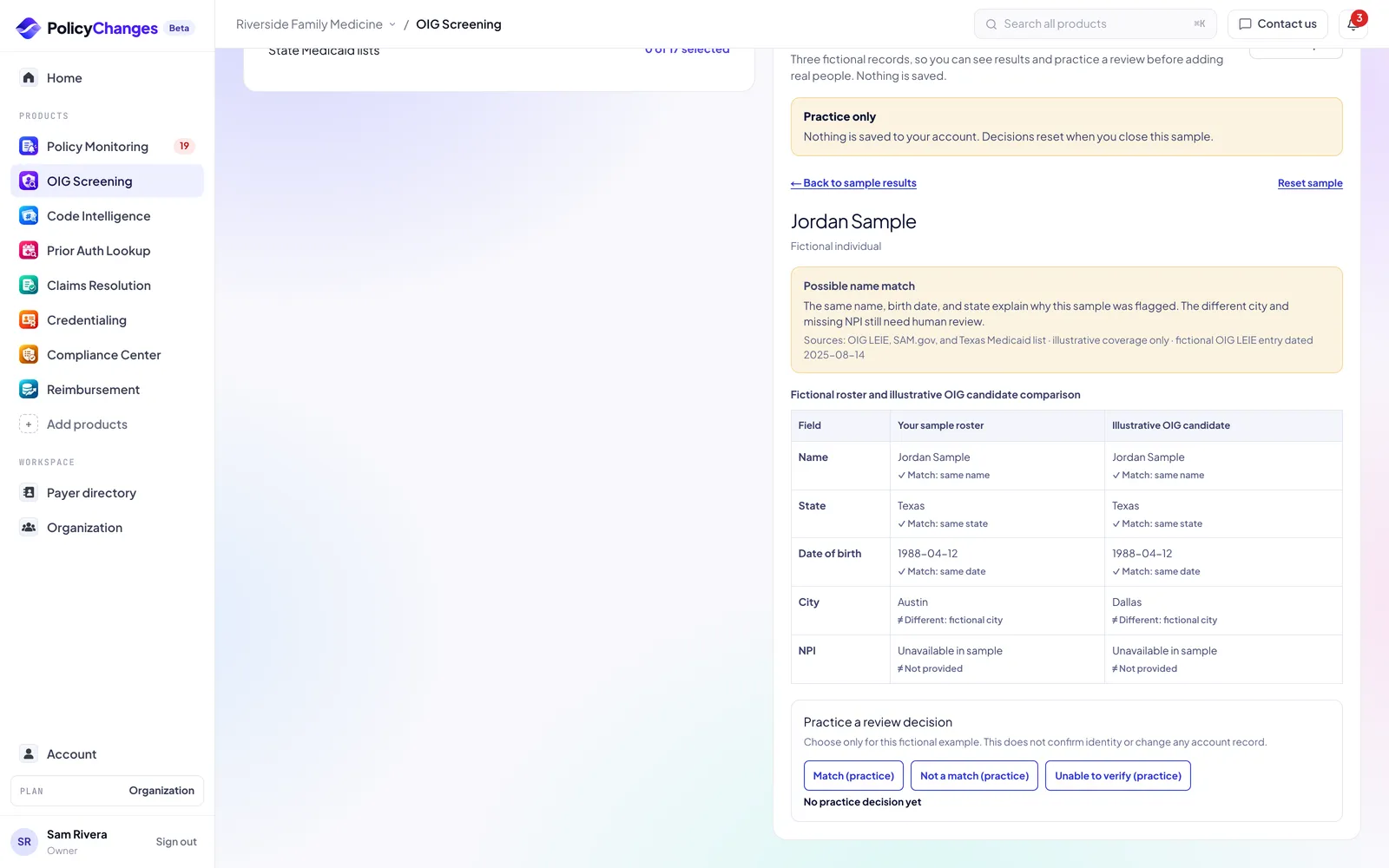
Each possible match shows your record next to the source record: name, date of birth, state, NPI, the exclusion type, the effective date, any end or reversal date and when the source was last retrieved. The comparison notes say what matches and what differs.
Record one of three decisions. Every decision is saved with the reviewer, the time and the date of the list you checked.
- Not a match
- You checked the source and it is a different person or business. Choose the reason, such as a different date of birth or NPI, and add a note when you choose Other.
- Confirm exclusion
- It is the same person or business. An evidence reference is required. Stop billing through and paying them, and escalate according to your policy.
- Unable to verify
- You need more information. The match stays open as Unable to verify.
History, sources and archive
- History
- Every screening run with its date, time, sources and how many records it flagged. Runs marked Did not complete or Partial coverage should be run again. A run that did not complete changes no result: the error says which lists could not be loaded.
- Sources
- Turn OIG LEIE and state Medicaid lists on or off. SAM.gov appears here when its list is available. Changes apply to the next screening, so run one after you change the selection.
- Archived
- People who leave and vendors you stop paying. Their screening history and decisions are kept. Restore a record and re-screen it before relying on it again.
Exports
Download summary gives the file to hand an auditor: the screening date, each source with its list date, everyone screened with their result, and every decision with its reviewer, reason, note, evidence reference and the list date checked, plus the sign-off when there is one.
Detailed evidence is the full technical file: every source field, match score and run fingerprint. Export the latest screening or any earlier one.
Sign-off and audit binder
In an organization, Organization, OIG sign-off lists every screening. Sign off each completed screening after its possible matches are decided, and the audit binder prints every signed screening in one place. Exports and the empty review queue link there.
Turn on Require second-person sign-off on that page, or in organization settings, when you set up screening. Each screening then has to be signed by a manager, admin or owner who did not run it. Only admins and the owner can turn the rule on or off, and they sign in again to do it.
How to read results
- No match found
- No possible match was found in the sources checked on that date. It is not a certification or a background check, and the check runs again on the next re-screen.
- Possible match
- A similar name was found. Match strength is Strong, Possible or Weak, based on name, date of birth, state and NPI. A person has to decide.
- Confirmed exclusion
- Someone on your team confirmed the match.
- Needs review or Unable to verify
- A decision is pending or more information is needed.
- Not screened
- Added but not screened yet, or every screening since it was added did not complete. It is never shown as No match found. Run a screening.
- Dates
- The source record shows the exclusion effective date and, when there is one, the end or reversal date. Last retrieved is when we last downloaded that source.
What each plan includes
- Free
- A sample dashboard with fictional people, so you can see results and practice a review. Real screening is not included.
- Basic and Pro
- Screening with no limit on people or vendors, re-screening, automatic monthly re-screens when HHS-OIG publishes a new file, email alerts on possible matches, screening history and evidence exports. The 30-day Pro trial includes it.
Data sources and freshness
- OIG LEIE
- The HHS-OIG List of Excluded Individuals and Entities. Federal, published monthly. On Basic and Pro your list is re-screened when a new file comes out.
- SAM.gov
- Federal exclusions from the System for Award Management. Updated daily.
- State Medicaid lists
- Each state publishes its own list on its own schedule. The Sources tab shows when each one was last retrieved and links to the official source.
Deadlines in your calendar
Account, Calendar gives you a private calendar link for Google Calendar, Outlook or Apple Calendar. It lists the deadlines of every product that is on for you: credential expirations and CAQH re-attestation, enrollment follow-ups, Compliance Center program and incident notice deadlines, the monthly OIG screening date, and act by dates for high impact payer changes in your scope.
Events never include patient details or claim numbers, and free text you typed (task names, risk and action titles) is not copied. Anyone with the link can read the event titles, so treat it like a password: Get a new link or Turn off in Account, Calendar stops the old one right away.
FAQ
- What is OIG screening, and does my practice need it?
- The HHS Office of Inspector General keeps a list of people and companies barred from federal health care programs, called the LEIE. Medicare and Medicaid will not pay for any item or service furnished, ordered or prescribed by someone on that list, and a practice that employs or contracts with an excluded person can face fines and have to repay those claims. Any practice that bills Medicare or Medicaid should check everyone it employs or pays at hire and then every month. OIG recommends regular screening and many state Medicaid programs require monthly checks. PolicyChanges checks the OIG list, SAM.gov and the state Medicaid lists you choose.
- Do I need Social Security numbers?
- No. The OIG list has no SSN field to compare against, and an SSN column is dropped at upload.
- Who should be on the list?
- Anyone you bill through or pay: employees, contractors, locums and vendors.
- What happens to someone who leaves?
- Archive them. The record, its screenings and its decisions stay in Archived as evidence.
- Does No match found mean someone is safe to hire?
- It means no possible match was found in the selected sources on that date. Keep screening monthly and follow your compliance policy.
Disclaimer
OIG Screening compares your list with the public exclusion lists you select, as published on the list dates shown. It is not a background check, a credentialing decision or a determination of anyone's eligibility to take part in federal health care programs.
A possible match is not a confirmed exclusion. Confirm identity against the official source before you act on it, and record what you checked.
No match found means no possible match was found in the selected lists on that date. Agencies update their lists on their own schedules, and a list can be late, incomplete or unavailable. Nothing here is legal advice; your compliance policy and counsel decide what to do with a result.