How Credentialing Tracker works
Overview
Credentialing Tracker replaces the spreadsheet and calendar reminders most practices use to track provider credentials and payer enrollments. You enter the dates and statuses you already track; we check each NPI against the public NPPES registry, link each provider to OIG Screening and remind your team before anything expires.
Credentialing Tracker keeps dates and statuses. It is not a credentials verification organization. We do not verify credentials with the issuing board and we do not submit applications to payers. Much of credentialing is manual work with payers and boards, so the product is built around tasks, follow-up dates and an audit trail of what your team did.
Getting started
- Click Add provider and type the NPI. Look up in NPPES fills in the name, credential, specialty, addresses and the state license numbers the provider lists. No NPI at hand? Search NPPES by name finds individual providers by last name, first name, state and specialty; pick the right one and it fills in the same way.
- Review the fields, keep the licenses you want to track and click Add provider.
- Open the provider and add the dates you track: license expiration, DEA, board certification, last CAQH attestation, malpractice policy end, Medicare revalidation and hospital privileges.
- Add one payer enrollment per payer and line of business, with its status and next follow-up date.
- Open Alerts and settings and choose who gets the reminders.
Providers
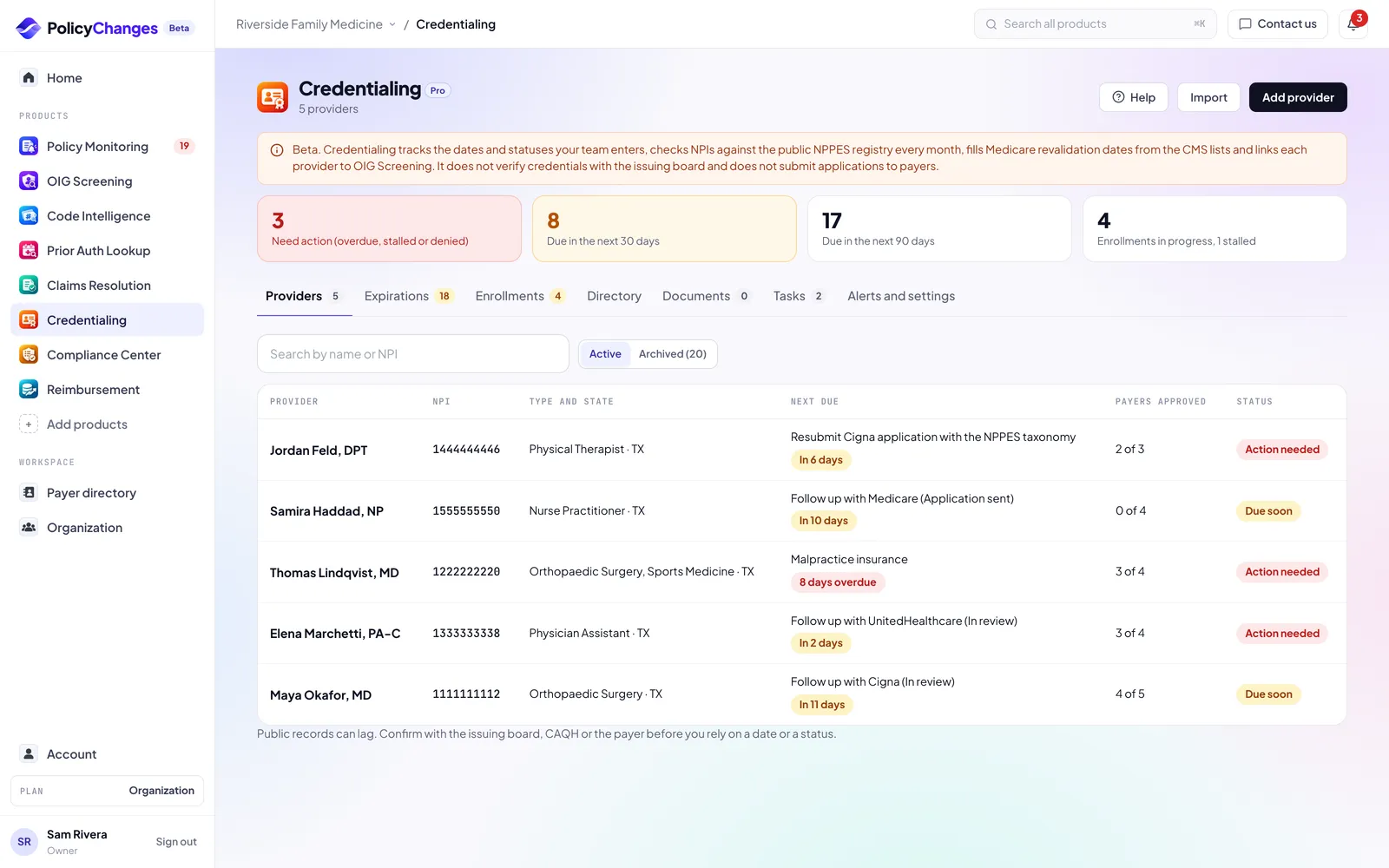
The Providers tab lists each provider with the next thing that comes due, how many payers have approved them and an overall status: Up to date, Due soon (something due in the next 90 days) or Action needed (something overdue, a denied enrollment or an application stalled for 45 days).
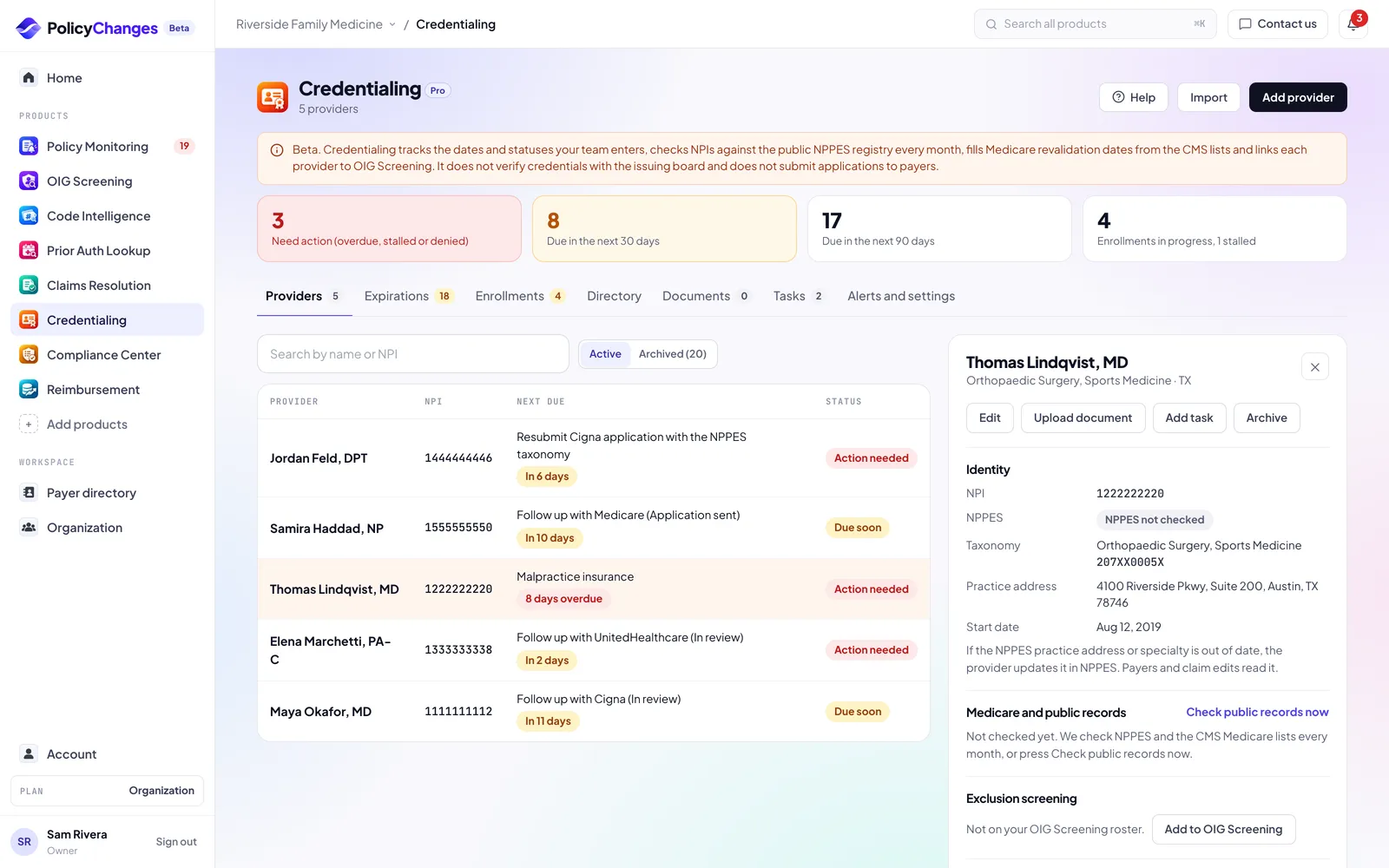
Click a provider to see everything about them: identity and NPPES status, exclusion screening, credentials, payer enrollments, documents, open tasks and links to the public lookups where you can verify a license.
Archive a provider who left. Archived providers stop counting toward your plan and stop sending reminders, and their history is kept. You can restore them.
- Check public records now
- Fetches the provider's current NPPES record and the CMS Medicare lists. We also do this every month and list what changed on the provider and in your reminder email. If the NPI was deactivated, or the practice address still shows a previous employer, ask the provider to update NPPES: payers and claim edits read it. Your own address and taxonomy are only filled from NPPES when they are blank.
- Add to OIG Screening
- Adds the provider to your OIG Screening roster so they are screened with everyone else. The exclusion result shows on the provider page.
Credentials and dates
- State license
- License number, state and expiration. Each provider page links to the public lookup of that state board.
- DEA registration
- DEA number, state and expiration. DEA registrations renew every 3 years.
- Board certification
- Board, specialty and expiration or next maintenance of certification date.
- CAQH attestation
- CAQH ID and the date of the last attestation. CAQH asks providers to re-attest every 120 days, so we set the next due date for you. Attested today records a new attestation in one click.
- Medicare revalidation
- Filled for you from the CMS Revalidation Due Date List each month, one entry per Medicare enrollment, marked From CMS. CMS publishes dates only for the next 6 months; TBD there means not due yet. You can still add your own entry with the PTAN.
- Directory
- Compares each provider's name, NPI, taxonomy, practice address and phone in Credentialing Tracker with NPPES and Medicare Care Compare, and says where to fix each difference: NPPES, PECOS, CAQH ProView and the payers that list the provider. Commercial payer directories are not read, because most payer terms do not allow automated access. Record the day you confirmed directory data with your payers and we remind you 90 days later.
- Medicare reassignment
- The groups a provider reassigns Medicare benefits to, from the CMS Revalidation Reassignment List. Add your group NPI in Alerts and settings to see whether each provider bills through your group.
- Malpractice insurance
- Carrier, policy number and the date the policy ends.
- Hospital privileges
- Hospital and the reappointment date.
Payer enrollments
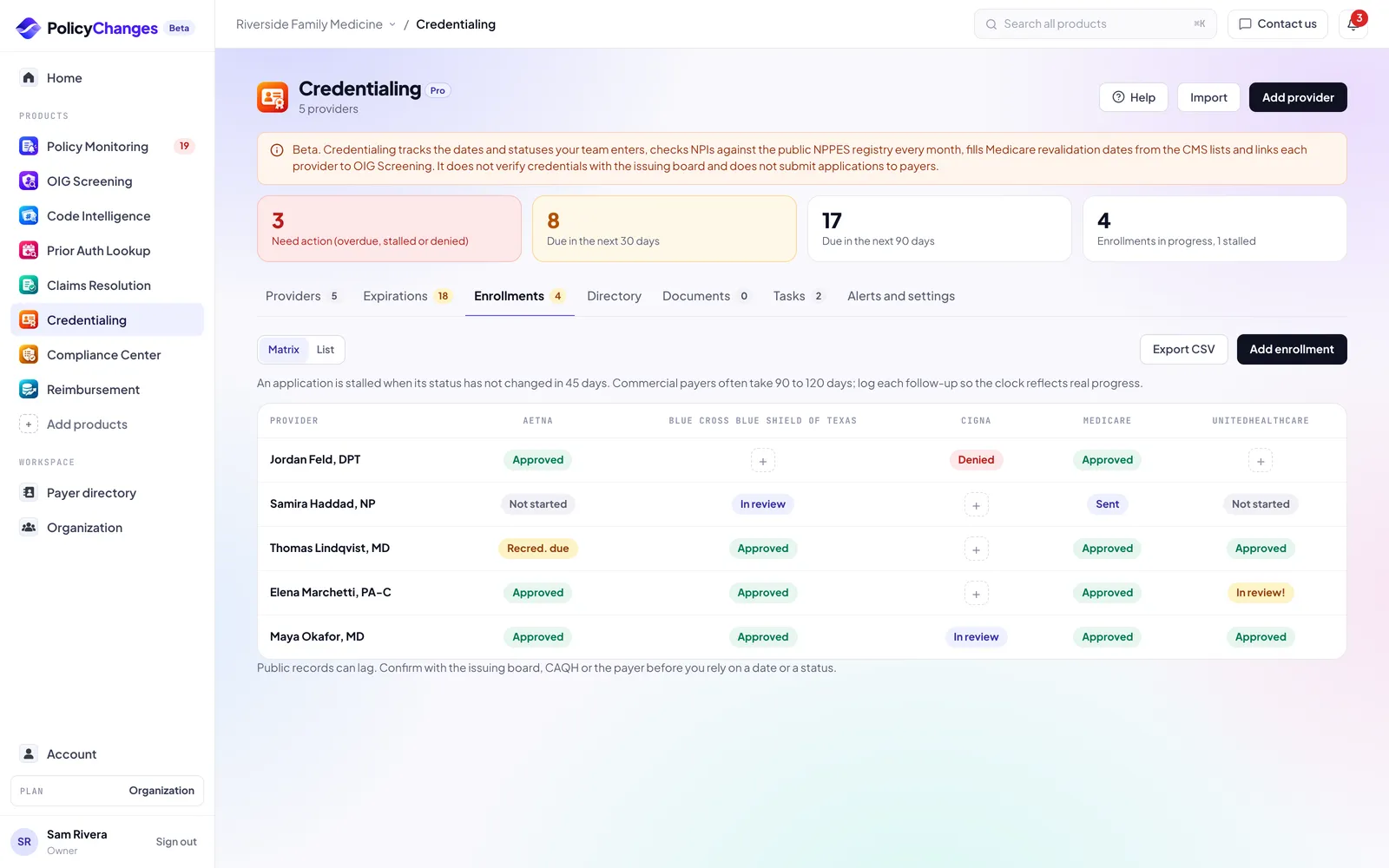
Add one enrollment per provider, payer and line of business. Move it through Not started, Application sent, In review, Approved or Denied, and Recredentialing due when the payer asks for it again.
Every status change and every logged follow-up goes on the enrollment timeline with who did it and when. An application is stalled when its status has not changed in 45 days.
The documents checklist lists what payers usually ask for. Add or remove items to match each payer.
The Matrix view shows providers as rows and payers as columns, so the front desk can see who can see which payer's patients today.
Expirations and tasks
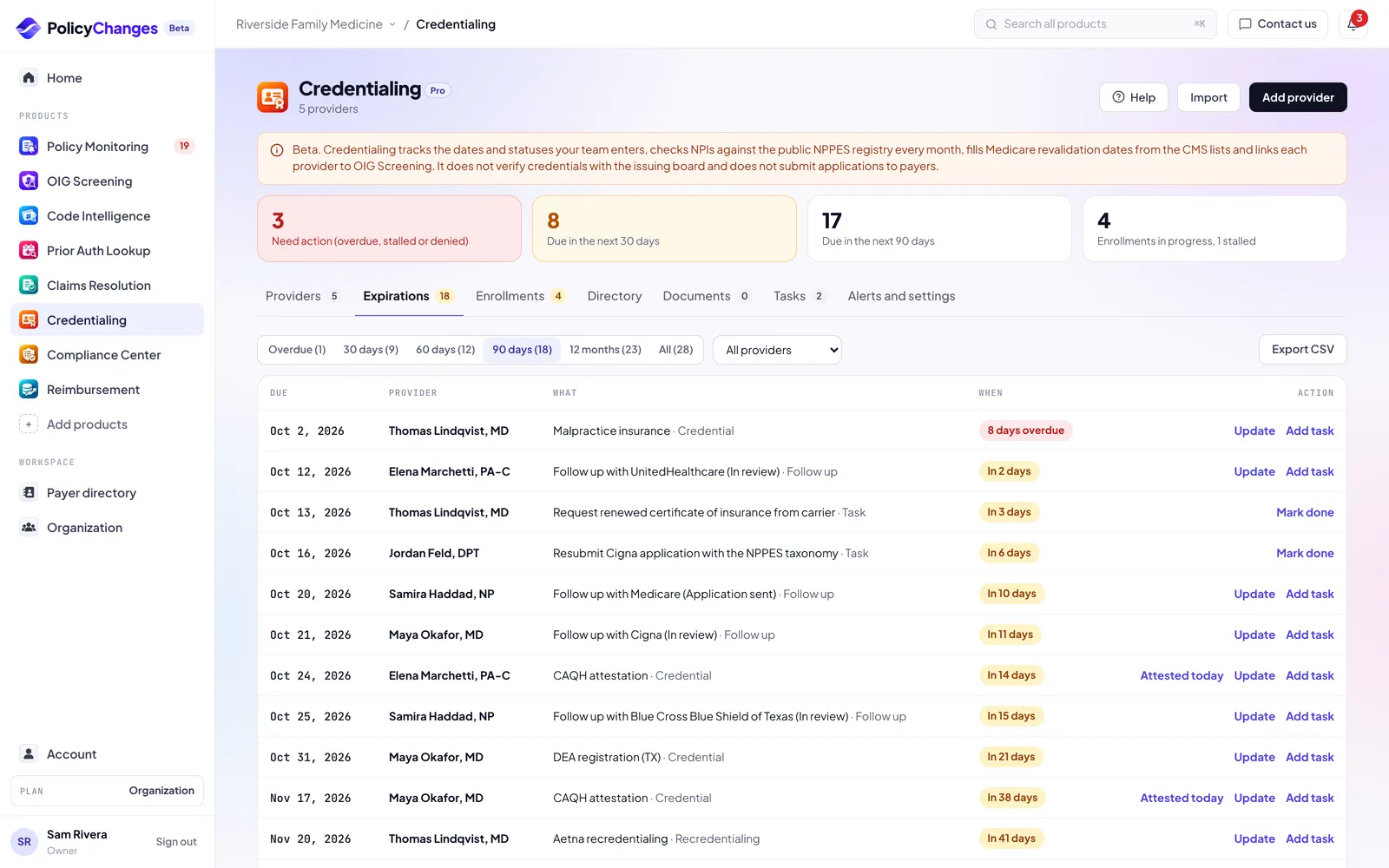
Expirations lists everything with a date: credential expirations, enrollment follow-ups, recredentialing dates and tasks. Filter by overdue, 30, 60 or 90 days, or the next 12 months, and export the list as CSV.
Tasks are the manual steps credentialing always involves: calling a payer, chasing a signature, reminding a provider to attest in CAQH. Add a task from any expiration, from a provider or from the Tasks tab.
Reminders
Once a day we check every date. When one crosses a reminder day you chose (90, 60 and 30 days by default) or passes, the recipients get one email with everything that crossed that day. Each reminder is sent once.
Pick Slack or Microsoft Teams channels in Alerts and settings to post the same list there. Channels are added in Policy Monitoring settings.
Documents
Upload license copies, DEA and board certificates, certificates of insurance, CAQH summaries and payer letters. PDF, PNG or JPG up to 10 MB. Files are encrypted at rest and only people in your workspace can open them.
Type the expiration date from the document when you upload it. We do not read dates from documents automatically. Uploading a renewal against a credential updates its expiration.
Do not upload patient information.
How to read statuses
- Up to date
- Nothing for this provider is due in the next 90 days.
- Due soon
- Something is due in the next 90 days. The pill shows how many days are left.
- Action needed
- A date has passed, a payer denied an enrollment, or an application has had no status change in 45 days.
- Active in NPPES
- The NPI is active in the public NPPES registry on the date we checked. It does not mean the provider is licensed or enrolled.
- Not screened yet
- The provider is on your OIG Screening roster but has not been screened. Run a screening in OIG Screening.
Data sources and freshness
- NPPES NPI registry
- The public CMS registry. We read it when you look up an NPI, add a provider, once a month, and when you press Check public records now.
- CMS Medicare lists
- The Revalidation Due Date List and the Revalidation Reassignment List on data.cms.gov, public and refreshed monthly by CMS.
- OIG Screening
- Exclusion results come from your OIG Screening runs against OIG LEIE, SAM.gov and the state lists you chose.
- State license boards
- Each provider page links to the public lookup of the state boards for that provider. We do not read those sites for you.
- Your team
- License, DEA, board, CAQH, malpractice, revalidation and privilege dates, and every payer enrollment status, are entered by your team.
What each plan includes
- Free and Basic
- Not included. If you tracked providers before, they are kept and no reminders are sent.
- Pro
- Every feature with no limit on providers, shared by everyone you add to your organization. The 30-day Pro trial includes it.
Deadlines in your calendar
Account, Calendar gives you a private calendar link for Google Calendar, Outlook or Apple Calendar. It lists the deadlines of every product that is on for you: credential expirations and CAQH re-attestation, enrollment follow-ups, Compliance Center program and incident notice deadlines, the monthly OIG screening date, and act by dates for high impact payer changes in your scope.
Events never include patient details or claim numbers, and free text you typed (task names, risk and action titles) is not copied. Anyone with the link can read the event titles, so treat it like a password: Get a new link or Turn off in Account, Calendar stops the old one right away.
FAQ
- Do you check CAQH, DEA or payer portals for me?
- No. CAQH, the DEA and payer portals do not offer public data, and we never log in to a site on your behalf. You enter those dates and statuses; we remind you.
- Is a provider "verified" when NPPES shows them as active?
- No. NPPES shows what the provider reported to CMS. Confirm licenses with the state board and enrollments with the payer.
- Does my team see the same providers?
- Yes. Everyone in your organization shares one list of providers.
- Can I export my data?
- Yes. Expirations and Enrollments export to CSV.
Disclaimer
PolicyChanges aggregates information that payers and government agencies publish. We summarize it and link every answer to its source, but we do not create the rules and we can miss or misread a change.
Nothing here is legal, medical, coding or billing advice, and nothing here is a guarantee of coverage or payment. Your patient's specific plan, your contract and the payer's current rules decide the outcome.
Always verify with the payer before you act, and record the reference number or the source you relied on.
Credentialing Tracker does not perform primary source verification and is not a credentials verification organization. Public records can lag behind the issuing board or payer.
Features, limits and data coverage can change, and we welcome reports of anything that looks wrong.