How Compliance Center works
Overview
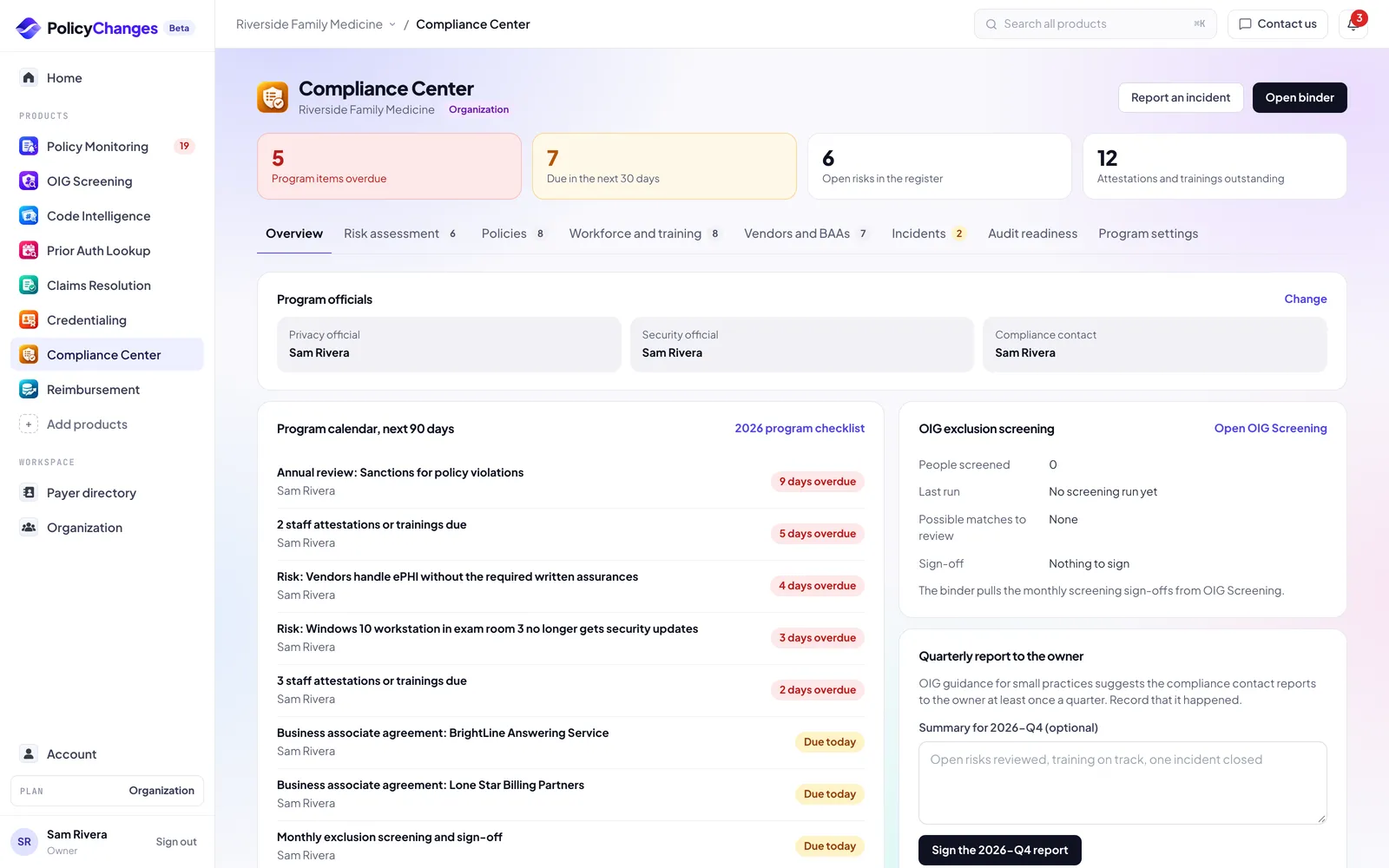
HIPAA asks every practice to do a set of recurring things and to keep proof that it did them: a yearly security risk assessment, written policies, staff training, agreements with vendors that handle patient information, and a log of incidents. Compliance Center keeps all of that in one place, with an owner and a due date for each item, and prints it as one binder when an auditor, a payer or a buyer asks.
It stores facts about your practice (systems, vendors, policies and people on your staff), never patient records. Notes and incident descriptions are checked for things that look like patient details before they are saved.
Compliance Center helps you organize and document your program. It does not make you compliant on its own and it is not legal advice. Compliance Center is part of Pro.
Getting started
- Name your people and vendors. In Program settings, pick your privacy and security officials. In Workforce and training, add your staff (or import them from OIG Screening). In Vendors and BAAs, list the vendors that handle patient information.
- Work through the yearly items. Start the risk assessment, add the starter policies you want and adapt them with your counsel, send them to staff for signature, and assign training.
- Show it when asked. Every item has an owner, a due date and a sign-off. Open the binder to print it or save it as a PDF.
Words you will see
- SRA (security risk assessment)
- The review HIPAA requires of where patient information lives in your practice, what could go wrong, and what you are doing about it. Most practices redo it every year.
- Risk register
- The list of risks from your assessment, each with an owner, a target date and a plan to reduce it. HIPAA calls this risk management.
- Attestation
- A staff member confirming they read a specific version of a policy. Each attestation is recorded with the date.
- BAA (business associate agreement)
- The contract HIPAA requires with every vendor that handles patient information for you, such as your EHR, billing service or IT support.
- Breach
- An incident involving patient information that HIPAA presumes is reportable unless a four factor risk assessment shows a low probability that the information was compromised.
- Binder
- Everything in your program for a year, on one printable page: the assessment, risks, policies and attestations, training, vendors, incidents and sign-offs.
Risk assessment
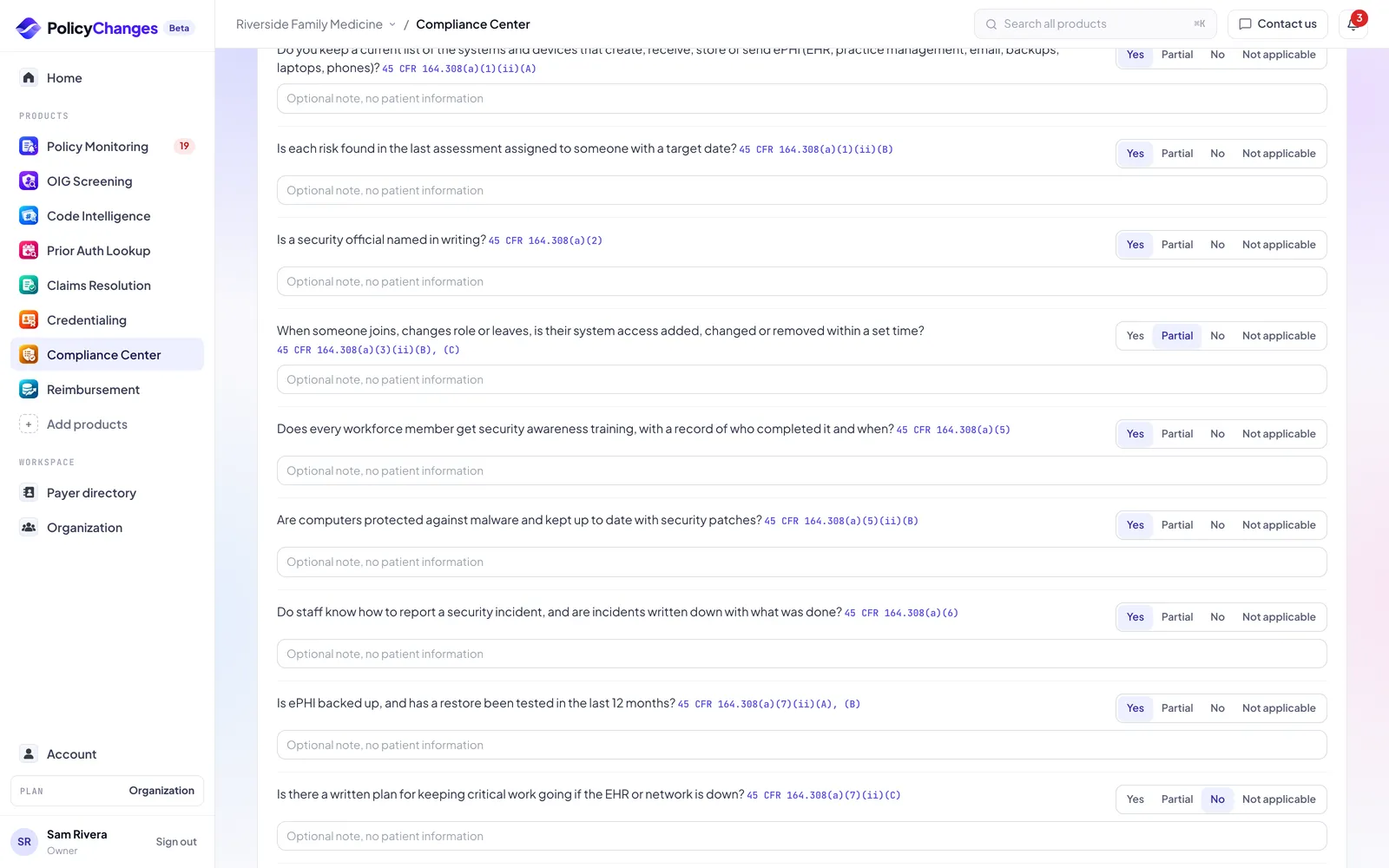
The guided assessment asks questions grouped by the HIPAA Security Rule, each with the CFR section it comes from. A No or Partial answer adds a proposed risk to the register. When you are done, a manager, admin or owner signs and locks the year.
If you already use the free HHS SRA Tool, you can record its findings as risks here instead. A new year starts from a copy of last year's answers.
Policies and attestations
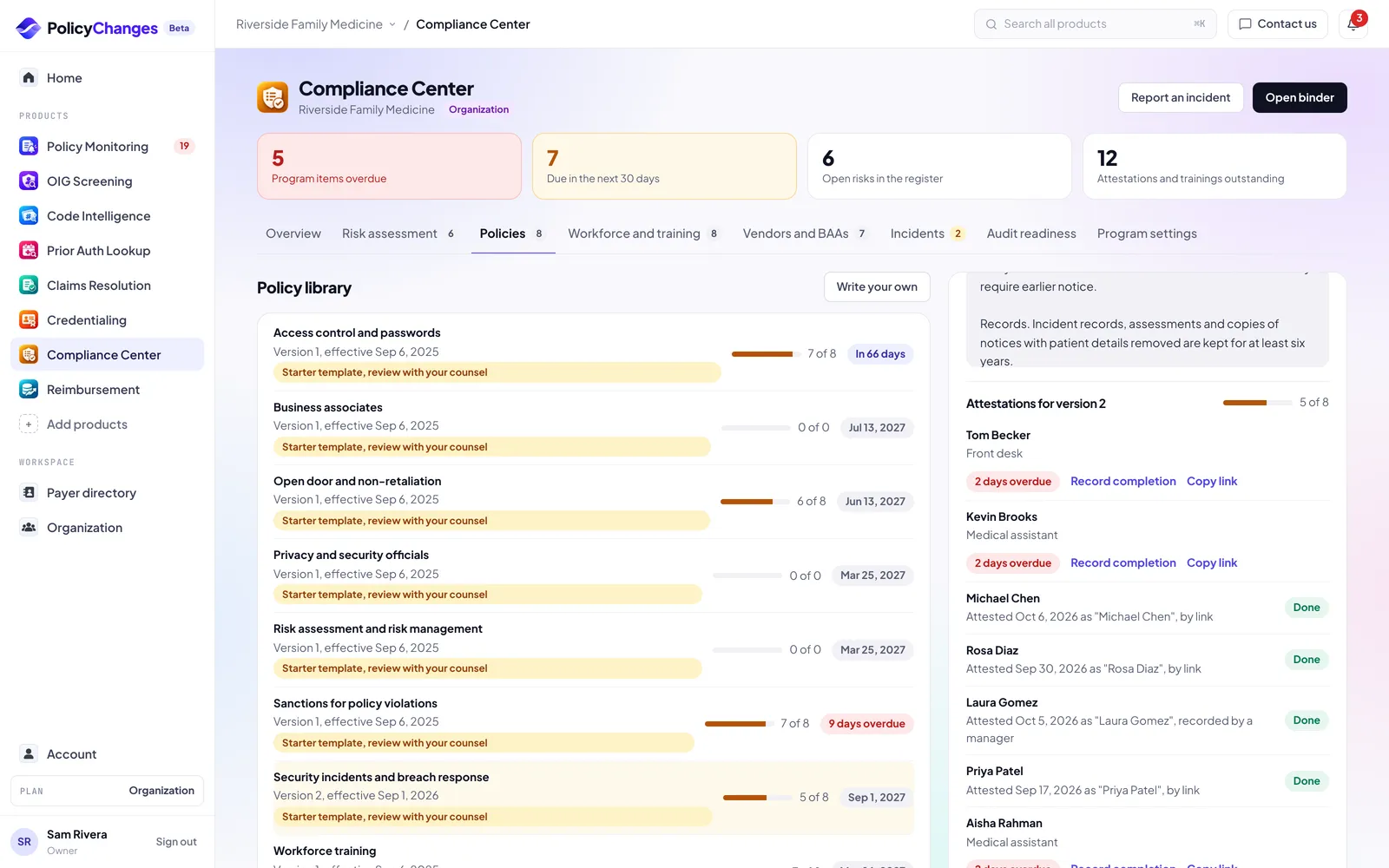
Add a starter policy or write your own. Starter policies are our plain English starting point; review them with your counsel and adapt them to your practice before you adopt them.
Each change creates a new version. Superseded versions are kept for six years. Ask staff to attest to the current version: people with a login attest in the app, and people without one attest through a link you copy and send yourself. We do not send emails for you.
Workforce and training
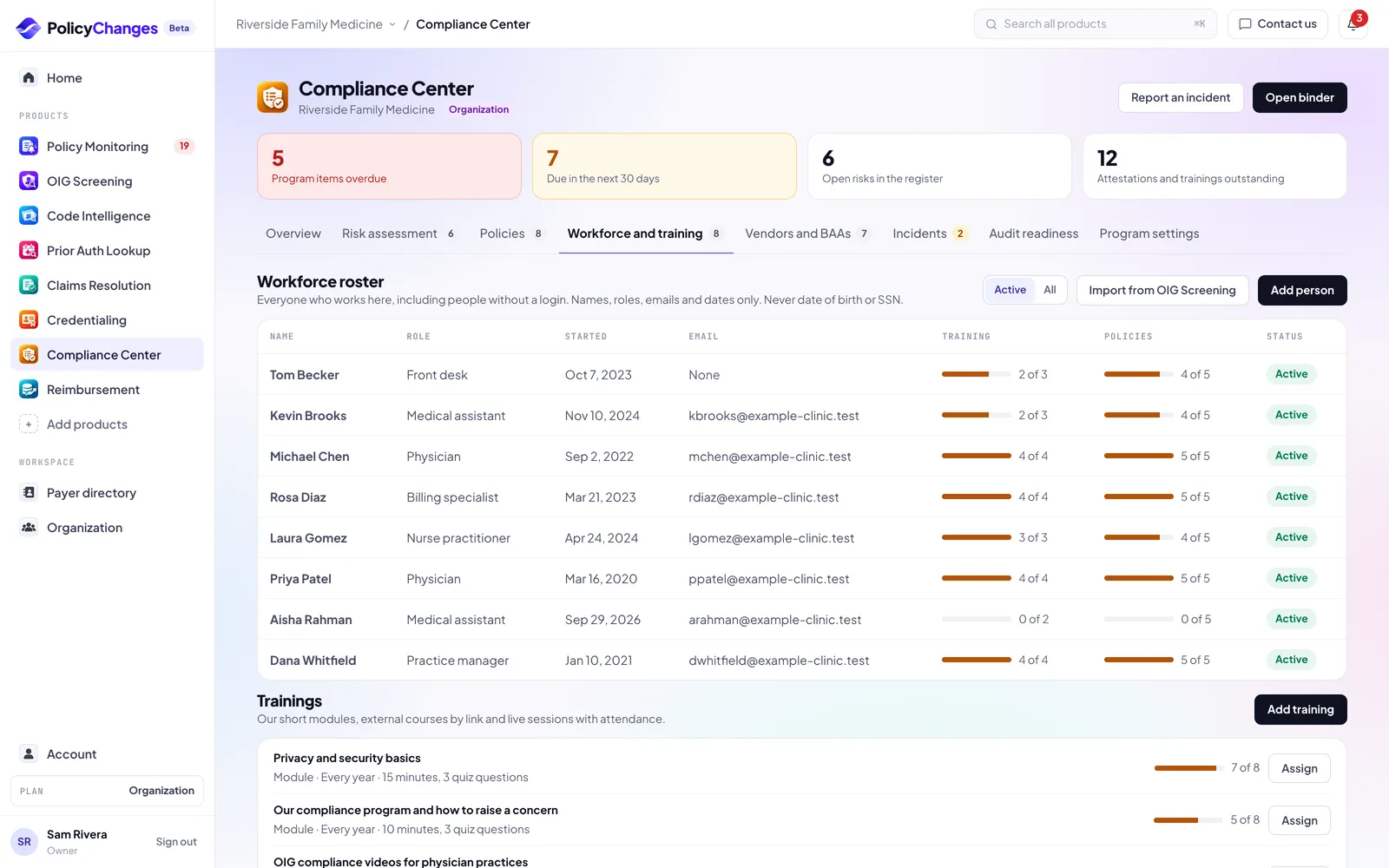
The roster is everyone who works at the practice, including people without a login. It holds names, roles, emails and dates only, never a date of birth or SSN. You can import people from OIG Screening.
Trainings can be our short modules, an external course by link, or a live session with attendance. Assign a training to people and track who finished it.
Vendors and BAAs
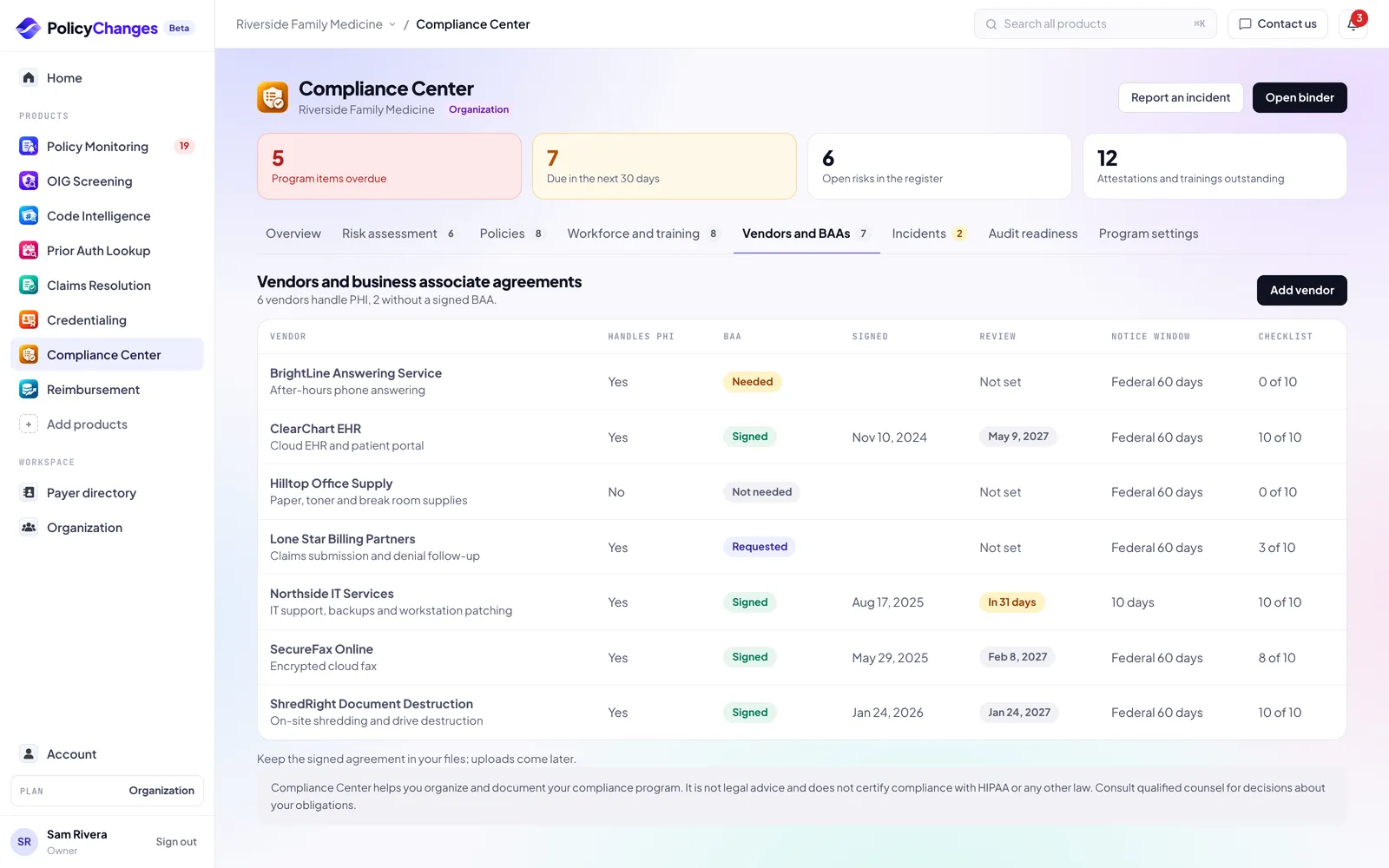
List every vendor that handles patient information for you and record the BAA status, the date it was signed and the next review date. Keep the signed agreement in your own files.
Incidents and breach dates
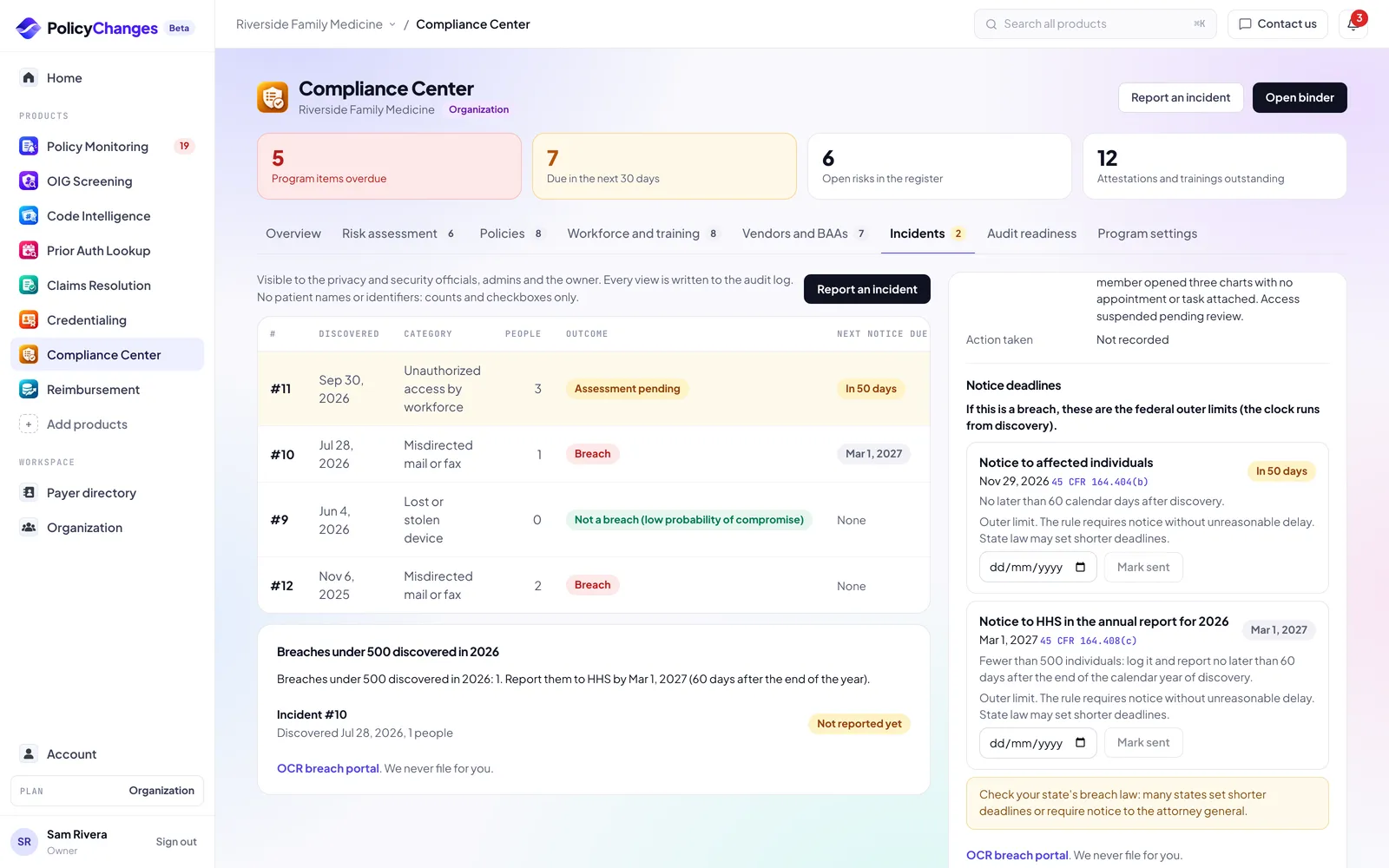
Log what happened and when you found out, without patient names. The breach assessment worksheet walks through the four factors in the HIPAA breach rule and records your practice's decision. Compliance Center does not decide whether an incident is a breach.
If the practice records that it is a breach, you see the federal notice dates worked out from the discovery date, such as notice to the people affected no later than 60 days after discovery, and the yearly HHS report for breaches affecting fewer than 500 people. State laws can set different deadlines; check yours.
Only the privacy and security officials, admins and the owner see incidents. The privacy official signs off once the assessment is recorded.
Audit readiness and the binder
Audit readiness is a checklist of what a practice needs before a Medicare records request arrives, plus a place to record internal documentation audits.
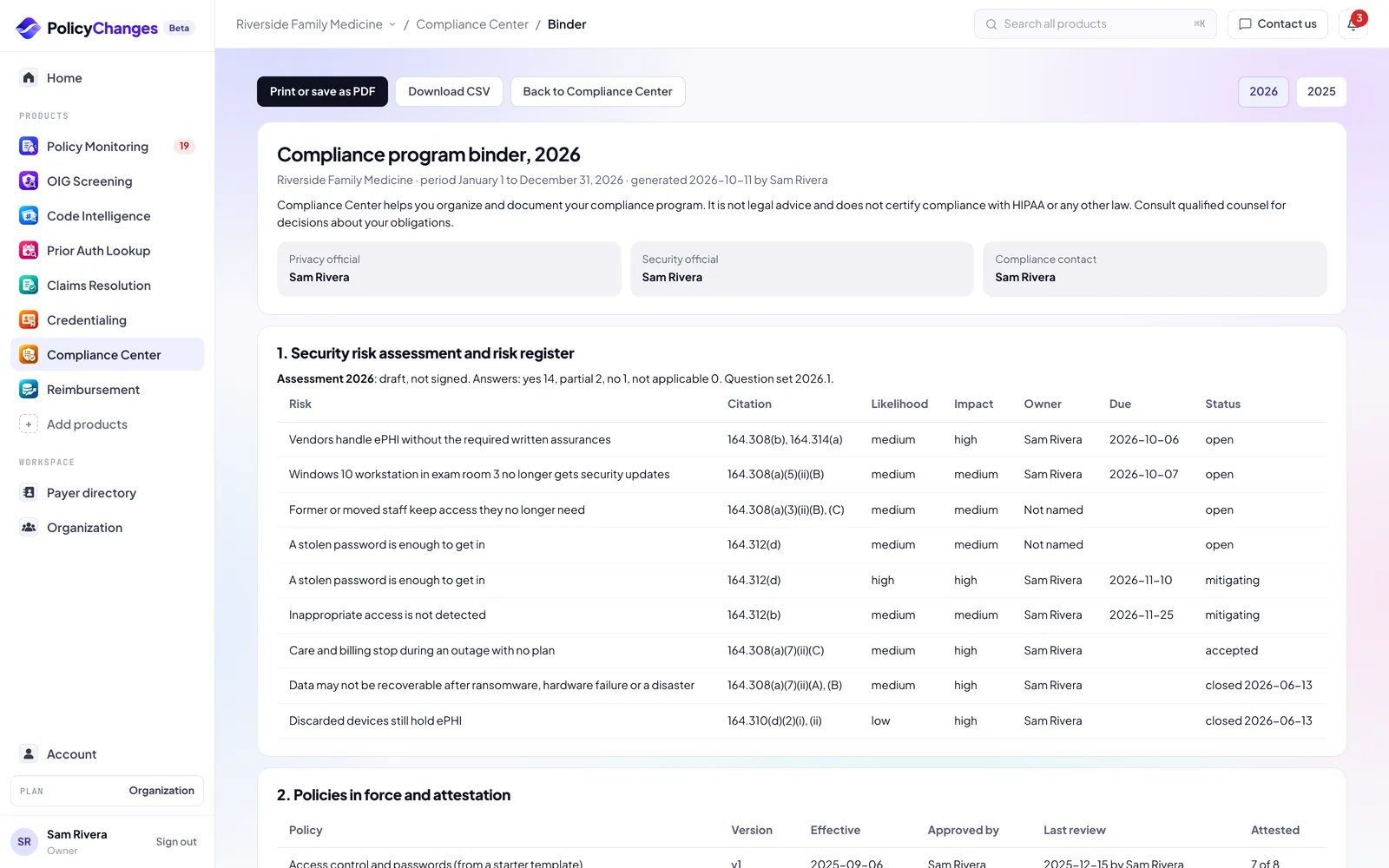
The binder pulls the whole year onto one page. Print it or save it as a PDF from your browser, or download the CSV. The quarterly report to the owner and the OIG Screening sign-offs are included.
A binder for a past year shows that year as it stood on December 31: the risks open during the year, the policy version in force then, and the attestations, reviews, incidents and sign-offs dated that year. The few things only kept in their current form, like the named officials, are marked "as of today".
The Overview checks itself from your records: each HIPAA requirement and each of OIG's seven elements shows its status and where to fix it. The person named on each calendar item gets an email 30, 14 and 7 days before it is due, on the due date and once it is overdue, unless they turned off the organization email digest.
A test entry or a mistake in the incident log or the risk register can be voided with a reason. It leaves the lists, the calendar and the binder, and the reason stays in the audit log.
How to read statuses
- Evidence on file
- The program element has the records it needs for this year, such as a signed assessment or current attestations.
- Needs attention
- Something is in progress or coming due, such as an open risk past its target date or staff who have not attested yet.
- Missing
- Nothing is recorded yet for this element this year.
- Due dates
- Each item shows how many days are left or how late it is. Dates more than 90 days out show the date itself.
- Sign-off
- A named person confirmed the item, with the date and their role at the time. Sign-offs are what the binder shows as proof.
Data and privacy
- What we store
- Facts about your practice: systems, vendors, policies, people on your staff with names, roles, emails and dates, and incident facts without patient details.
- What we block
- Notes, policy text and incident descriptions that look like they contain patient information, such as a patient name, a date of birth, a medical record number or a member ID.
- Encryption
- Notes, policy text and incident details are sealed with your organization key when your organization turns on data encryption.
- Rule citations
- Assessment questions and risks link to the HIPAA section they come from on the Cornell Legal Information Institute copy of the rule, so you can read the rule yourself.
What each plan includes
- Free and Basic
- Not included. Compliance Center is part of Pro and is not sold as an add-on.
- Pro
- Included for the whole practice, the 30-day Pro trial too. Staff attest and record training through a link without needing a seat. Managers, admins and owners run the program.
Deadlines in your calendar
Account, Calendar gives you a private calendar link for Google Calendar, Outlook or Apple Calendar. It lists the deadlines of every product that is on for you: credential expirations and CAQH re-attestation, enrollment follow-ups, Compliance Center program and incident notice deadlines, the monthly OIG screening date, and act by dates for high impact payer changes in your scope.
Events never include patient details or claim numbers, and free text you typed (task names, risk and action titles) is not copied. Anyone with the link can read the event titles, so treat it like a password: Get a new link or Turn off in Account, Calendar stops the old one right away.
FAQ
- Does Compliance Center make us HIPAA compliant?
- No. It organizes the work and keeps the proof. Whether you comply depends on what your practice does. Talk to your counsel about your obligations.
- Why was my note blocked?
- It looked like it might contain patient information, such as a patient name, a date of birth or a member ID. Describe what happened, not who it happened to.
- Does it run OIG exclusion screening?
- No. OIG Screening does that. Compliance Center shows its status on the overview and adds the monthly sign-offs to the binder.
- Can staff without a login attest?
- Yes. Copy their attestation link from the policy and send it yourself.
Disclaimer
PolicyChanges aggregates information that payers and government agencies publish. We summarize it and link every answer to its source, but we do not create the rules and we can miss or misread a change.
Nothing here is legal, medical, coding or billing advice, and nothing here is a guarantee of coverage or payment. Your patient's specific plan, your contract and the payer's current rules decide the outcome.
Always verify with the payer before you act, and record the reference number or the source you relied on.
Compliance Center helps you organize and document your compliance program. It is not legal advice and does not certify compliance with HIPAA or any other law. Consult qualified counsel for decisions about your obligations.
Features, limits and data coverage can change, and we welcome reports of anything that looks wrong.